The CRM Plus · 458 N Maclay Ave, San Fernando, CA 91340 · (818) 797-0148
This page documents how Mission Real Estate obtains express written consent before sending any SMS message, for review by carriers, aggregators, and The Campaign Registry. Mission Real Estate uses three opt-in paths. Each path is described step-by-step below, and the actual specimen forms and recorded language are linked as hostable PDFs and images.
Campaign & Brand
Brand: Mission Real Estate · Legal entity: Mission Real Estate Services, Inc. · Sending number: (818) 797-0148 · Use case: Conversational / Customer Care (real-estate transactional SMS to clients and leads who have provided express written consent).
The consumer types their name, email, mobile number, and inquiry message into the form fields.
An unchecked SMS-consent checkbox appears directly above the Submit button. The checkbox is never pre-checked.
The disclosure shown next to the checkbox reads, verbatim: “I agree to receive text messages from Mission Real Estate at the number provided, including transactional updates and replies to my inquiry. Message and data rates may apply. Message frequency varies. Reply STOP to opt out, HELP for help. Consent is not a condition of purchase. See SMS Terms and Privacy Policy.” The words SMS Terms and Privacy Policy are clickable links to /sms-terms and /privacy.
The consumer must affirmatively click the checkbox. The Submit button is disabled until the checkbox is checked.
On submit, Mission Real Estate stores in its database: the consumer’s mobile number, the timestamp of consent, the IP address, the form URL where consent was given, and the exact disclosure text shown at the moment of consent.
Mission Real Estate then sends a single welcome SMS confirming the program, message frequency, and STOP/HELP keywords. No marketing message is sent before this welcome.
Where it happens: in-person at Mission Real Estate open houses, hosted by licensed Mission Real Estate agents in California.
Step-by-step mechanics:
The agent places a printed Open-House Sign-In Sheet at the entry table. The sheet has columns for Name, Email, Phone, and a separate dedicated checkbox column labeled “SMS OK”.
Directly above the columns, the sheet prints the verbatim disclosure: “By checking the SMS OK box, I agree to receive text messages from Mission Real Estate at the number I provided, including replies to my inquiry and follow-ups about this property and similar listings. Message and data rates may apply. Reply STOP to opt out. Consent is not a condition of any home purchase.”
The visitor writes their name, email, phone, and only checks the SMS OK box if they consent. Phone is required to attend; the SMS box is not.
Within 24 hours, the hosting agent transcribes the sign-in entries into the Mission Real Estate CRM. The CRM record stores: phone, source (“open house”), property address, date of the open house, and whether the SMS OK box was checked.
Only contacts with the SMS OK box checked are marked SMS-eligible in the CRM. The agent retains the original paper sheet for at least three years as required by California broker supervision rules.
Mission Real Estate then sends a single welcome SMS confirming the program and STOP/HELP keywords before any other message.
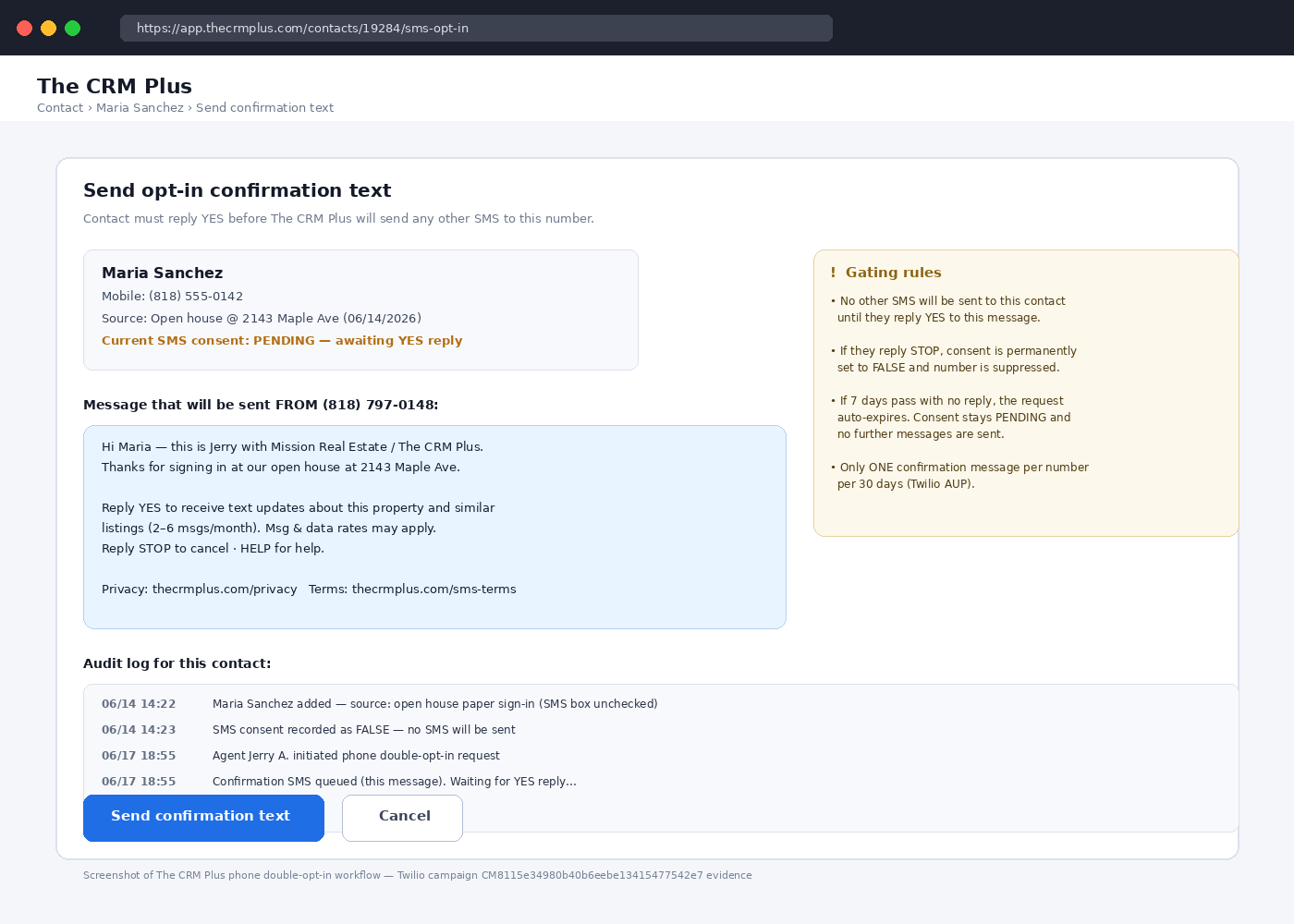
Where it happens: by phone when a consumer calls or speaks with a Mission Real Estate agent and asks to be texted instead of called.
Step-by-step mechanics:
The consumer initiates contact with a Mission Real Estate agent (inbound call, in-person conversation at a showing, or referral handoff) and gives their mobile number.
The agent reads the verbatim verbal disclosure script: “Before I text you, I need your permission. Can I confirm: do you agree to receive text messages from Mission Real Estate at (818) 797-0148 about your real-estate inquiry? Message and data rates may apply. You can reply STOP at any time to opt out. Yes or no?”
The agent only proceeds if the consumer answers “yes” verbatim. The agent logs the verbal consent in the CRM with: phone, agent name, timestamp, and the exact wording “verbal yes”.
The CRM then automatically sends a double opt-in SMS to the number: “Mission Real Estate: Reply YES to confirm you want text messages from us. Msg & data rates may apply. Reply STOP to cancel, HELP for help.”
The consumer must reply YES from their mobile number. The CRM stores the inbound YES message body, the timestamp, and the originating phone number as the binding opt-in record.
Only after the YES reply is received does the CRM unlock outbound messaging to that number. If the consumer never replies, the number stays blocked from outbound SMS.
Mission Real Estate then sends a single welcome SMS confirming the program, frequency, and STOP/HELP keywords.
The first message sent on any opt-in path is the welcome confirmation: “Mission Real Estate: You’re opted in to text updates about your real-estate inquiry. Msg frequency varies. Msg & data rates may apply. Reply HELP for help, STOP to cancel. https://www.thecrmplus.com/sms-terms”
Sample Messages
“Mission Real Estate: Hi Maria, this is Jerry from Mission Real Estate. Following up on the open house at 458 N Maclay Ave on Sat. Want to schedule a private tour? Reply STOP to opt out.”
“Mission Real Estate: Your showing at 6pm on Thurs is confirmed. Address: 12345 Maple Ave, San Fernando. Reply HELP for help, STOP to opt out.”
Opt-Out, Help, and STOP/HELP Handling
Every outbound message includes STOP/HELP keywords. STOP, STOPALL, UNSUBSCRIBE, CANCEL, END, and QUIT immediately remove the number from all Mission Real Estate outbound SMS and trigger one confirmation reply (“Mission Real Estate: You’ve been unsubscribed. No more messages will be sent. Reply START to resubscribe.”). HELP returns a help message with brand name, contact phone, and email. See /sms-terms for full keyword handling.
Privacy & No-Sharing Statement
No mobile information — including mobile opt-in data, phone numbers, and SMS consent — will be shared with third parties or affiliates for marketing or promotional purposes. Full policy: /privacy.